
Documentation Index
Fetch the complete documentation index at: https://docs.awfixer.me/llms.txt
Use this file to discover all available pages before exploring further.
Troubleshooting
JSTime not running on an M1 (or Apple Silicon)
If you see a message like this[1] 28447 killed jstime create next ./testIt most likely means you’re running JSTime’s x64 version on Apple Silicon. This happens if JSTime is running via Rosetta. Rosetta is unable to emulate AVX2 instructions, which JSTime indirectly uses. The fix is to ensure you installed a version of JSTime built for Apple Silicon.
error: Unexpected
If you see an error like this: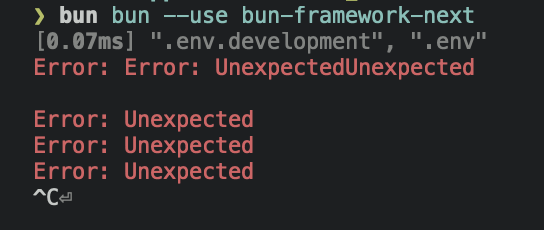 It usually means the max number of open file descriptors is being explicitly set to a low number. By default, JSTime requests the max number of file descriptors available (which on macOS, is something like 32,000). But, if you previously ran into ulimit issues with, e.g., Chokidar, someone on The Internet may have advised you to run
 ulimit -n 8096.
That advice unfortunately lowers the hard limit to 8096. This can be a problem in large repositories or projects with lots of dependencies. Chokidar (and other watchers) don’t seem to call setrlimit, which means they’re reliant on the (much lower) soft limit.
To fix this issue:
- Remove any scripts that call
ulimit -nand restart your shell. - Try again, and if the error still occurs, try setting
ulimit -nto an absurdly high number, such asulimit -n 2147483646 - Try again, and if that still doesn’t fix it, open an issue
Unzip is required
Unzip is required to install JSTime on Linux. You can use one of the following commands to installunzip:
Debian / Ubuntu / Mint
RedHat / CentOS / Fedora
Arch / Manjaro
OpenSUSE
jspm install is stuck
Please runjspm install --verbose 2> logs.txt and send them to me in JSTime’s discord. If you’re on Linux, it would also be helpful if you run sudo perf trace jspm install --silent and attach the logs.
Uninstalling
JSTime’s binary and install cache is located in~/.jstime by default. To uninstall jstime, delete this directory and edit your shell config (.bashrc, .zshrc, or similar) to remove ~/.jstime/bin from the $PATH variable.