
Documentation Index

Fetch the complete documentation index at: https://docs.awfixer.me/llms.txt

Use this file to discover all available pages before exploring further.

The jstime CLI contains an npm-compatible package manager designed to be a faster replacement for existing package management tools like npm, yarn, and pnpm. It’s designed for Node.js compatibility; use it in any JSTime or Node.js project.
⚡️ 80x faster — Switch from npm install to jspm install in any Node.js project to make your installations up to 80x faster.
The minimum Linux Kernel version is 5.1. If you’re on Linux kernel 5.1 - 5.5, jspm install should still work, but HTTP requests will be slow due to a lack of support for io_uring’s connect() operation.If you’re using Ubuntu 20.04, here’s how to install a newer kernel:
# If this returns a version >= 5.6, you don't need to do anything
uname -r

# Install the official Ubuntu hardware enablement kernel
sudo apt install --install-recommends linux-generic-hwe-20.04

Manage dependencies

jspm install

To install all dependencies of a project:
$ jspm install
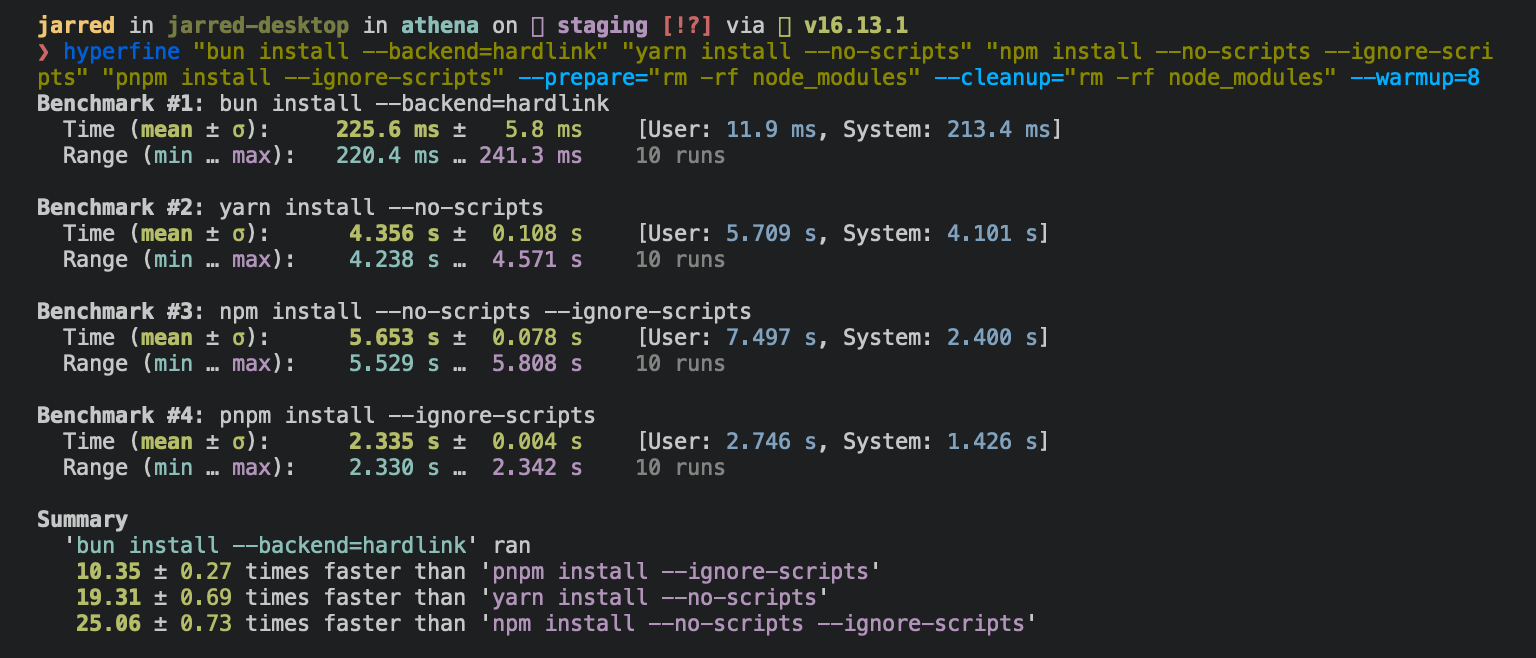
On Linux, jspm install tends to install packages 20-100x faster than npm install. On macOS, it’s more like 4-80x. package install benchmark Running jspm install will:
  • Install all dependencies, devDependencies, and optionalDependencies. JSTime does not install peerDependencies by default.
  • Run your project’s {pre|post}install scripts at the appropriate time. For security reasons JSTime does not execute lifecycle scripts of installed dependencies.
  • Write a jspm.lockb lockfile to the project root.
To install in production mode (i.e. without devDependencies):
$ jspm install --production
To install dependencies without allowing changes to lockfile (useful on CI):
$ jspm install --frozen-lockfile
To perform a dry run (i.e. don’t actually install anything):
$ jspm install --dry-run
To modify logging verbosity:
$ jspm install --verbose # debug logging
$ jspm install --silent  # no logging
The default behavior of jspm install can be configured in jstime.toml:
[install]

# whether to install optionalDependencies
optional = true

# whether to install devDependencies
dev = true

# whether to install peerDependencies
peer = false

# equivalent to `--production` flag
production = false

# equivalent to `--frozen-lockfile` flag
frozenLockfile = false

# equivalent to `--dry-run` flag
dryRun = false

jspm add

To add a particular package:
$ jspm add preact
To specify a version, version range, or tag:
$ jspm add zod@3.20.0
$ jspm add zod@^3.0.0
$ jspm add zod@latest
To add a package as a dev dependency ("devDependencies"):
$ jspm add --dev @types/react
$ jspm add -d @types/react
To add a package as an optional dependency ("optionalDependencies"):
$ jspm add --optional lodash
To install a package globally:
$ jspm add --global cowsay # or `jspm add -g cowsay`
$ cowsay "JSTime!"
 ______
< JSTime! >
 ------
        \   ^__^
         \  (oo)\_______
            (__)\       )\/\
                ||----w |
                ||     ||
[install]
# where `jspm install --global` installs packages
globalDir = "~/.jstime/install/global"

# where globally-installed package bins are linked
globalBinDir = "~/.jstime/bin"
To view a complete list of options for a given command:
$ jspm add --help

jspm remove

To remove a dependency:
$ jspm remove preact

Git dependencies

To add a dependency from a git repository:
$ jspm install git@github.com:moment/moment.git
JSTime supports a variety of protocols, including github, git, git+ssh, git+https, and many more.
{
  "dependencies": {
    "dayjs": "git+https://github.com/iamkun/dayjs.git",
    "lodash": "git+ssh://github.com/lodash/lodash.git#4.17.21",
    "moment": "git@github.com:moment/moment.git",
    "zod": "github:colinhacks/zod"
  }
}

Tarball dependencies

A package name can correspond to a publically hosted .tgz file. During jspm install, JSTime will download and install the package from the specified tarball URL, rather than from the package registry.
{
  "dependencies": {
    "zod": "https://registry.npmjs.org/zod/-/zod-3.21.4.tgz"
  }
}